Know what learners understood. Before the next week starts.
Use lightweight weekly checks to catch weak understanding early, give learners immediate feedback, and help instructors see where attention is needed.
Interactive demo · No signup required
Week 2 check: Personal protective equipment
Nice work — 80%. Want to see where you lost points?
- Putting on, taking off and changing PPE4 of 4 correct
- Revisit: Masks and respiratorsQ3 missed · a surgical mask is not a respirator
- Watch
- Check
- Apply
- Earn
Assessment shouldn’t interrupt learning. It should move learning forward.
The weekly quiz is the Check in Watch → Check → Apply → Earn. Select a stage to preview it.
- Lesson video · How models answer
- Reading · Grounding with your own documents
Production functionality Video lessons and readings sit in the week’s module and count toward progress.
Production functionality The weekly quiz opens with the week. It’s marked on the server the moment it’s submitted.
- Draft a grounded FAQ answer for your team
Production functionality Assignments collect a submission and get instructor feedback.
- Weeks completed
- Certificate
Production functionality Passed quizzes complete their lessons and count toward course completion and the certificate.
A weekly check, from the learner’s side
Four questions, about three minutes. Your result carries through to the instructor view below.
Week 3 check: AI Fundamentals
You’ll check each answer as you go and see why it’s right or wrong.
Concept demo The product marks each answer and shows the score. Topic insights, explanations and next steps are shown here as a concept.
The same answer becomes an instructor signal
Switch roles to see what the learner, the instructor and the L&D lead each get from this week’s check.
This week’s queue
- Watch · How models answer
- Check · Weekly quiz
- Apply · Grounded FAQ answer
- Reflect · What would you ground first?
- Momentum
- On track Live
- Day streak
- 5 days Live
- This week’s result
- Not taken yet Live
- Understanding
- — Concept
- Weak area
- — Concept
Momentum and the day streak are live today and count lesson completions. Understanding and weak areas are concepts.
- Quiz completion
- 86%
- Average score
- 78%
- Need attention
- 6
- Since week 1
- +8%
Knowledge gaps this week
- Model grounding41% missed
- Evaluation22% missed
- Hallucination9% missed
Live Per-question results and the most-missed question are in quiz analytics today. Grouping by topic is a concept.
Learners requiring attention
- Aisha KhanQuiz score 40% · 72% the week before
- Noah WilliamsQuiz not started · Opened 2 days ago
- Lucas FerreiraRepeated difficulty · Sampling bias, 3 weeks
Demo interactions Nothing here contacts anyone. Admins can send catch-up nudges to cohort learners today. Drafted messages and assigned practice are concepts.
Learning signals
Demo message prepared. Nothing was sent.
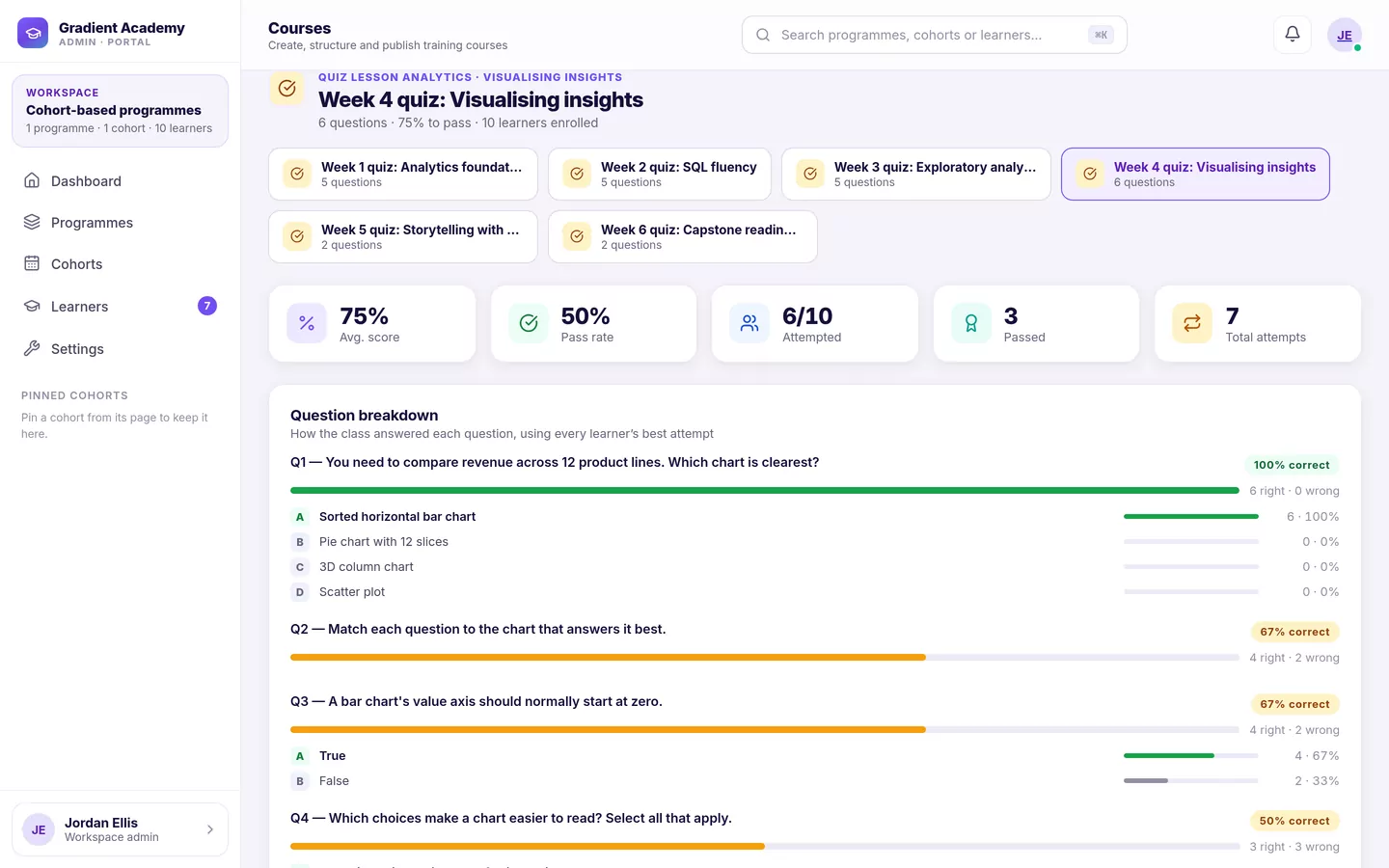
See the quiz analytics screen as it is today
- Active learners
- 1,248
- Participation
- 92%
- Average understanding
- 84%
- Knowledge gaps
- 68
Programs by average quiz score
- Compliance Refresher91%
- Customer Onboarding87%
- Applied AI & Data78%
- Sales Foundations74%
Common knowledge gaps
- Model groundingApplied AI & Data · 3 cohorts
- Handling objectionsSales Foundations · 2 cohorts
- Data retention rulesCompliance Refresher · 1 cohort
Quiz analytics today are per quiz and per cohort. The organization-wide roll-up is a concept.
A quiz result shouldn’t end at a score.
What happens after Maya answers, step by step.
-
1
Learner answers
Maya submits the Week 3 check.
Live today -
2
Evaluation
Marked on the server: 3 of 4 correct.
Live today -
3
Weak concept detected
The missed question is on model grounding.
Concept -
4
Learner feedback
An explanation and a 3-minute review.
Concept -
5
Instructor signal
Grounding is this week’s most-missed question.
Live today -
6
Targeted action
A nudge with the review attached.
Concept -
7
Back to momentum
Maya reviews, then moves on to Apply.
Concept
Build next week’s check in minutes
Write questions yourself or have AI suggest some from the week’s topic. You review every one before it’s added.
Questions
Concept demo The AI course builder drafts quiz questions today. Generating them inside the quiz editor is a concept.
Live Seven question types, a pass mark and attempt limits are in the quiz editor today. Points and explanations are concepts.
Six weeks of checks, one clear trend
Weekly results add up to a picture of whether understanding is improving, and where it isn’t.
Quiz analytics show each quiz’s average today. A trend across weeks is a concept.
- Most improved topicHallucination61% → 88% correct since week 2Demo data
- Highest-friction questionWeek 3 · Q2 on groundingMissed by 41% of learnersMost-missed question is live
- Learners recovering5 of 6Back above the pass mark after a low weekConcept demo
- Participation trend88% → 92%Share of learners taking the weekly checkDemo data
A score drops. What do you do?
Maya scores 40% on the Week 5 check. Her earlier checks averaged 76%.
Learning signals
- Quiz score down40% this week, 76% beforeLive
- Lesson replays upSampling lesson opened 4 timesConcept
- Assignment incompleteWeek 5 task, due 2 days agoLive
- Behind cohort paceAbout a week behindLive
Maya appears to be struggling with statistical sampling. Recommended: a 6-minute revision on sampling, plus a message from her mentor.
- Revision assigned: Sampling in 6 minutes
- Mentor nudge prepared for Maya
- Learning queue updated: revision first, then the Week 5 task
Simulated recovery plan. Nothing was assigned or sent.
Live today: cohort learners who fall behind pace or go inactive are flagged, and admins can send them a catch-up nudge. Diagnosing the topic and building the plan are concepts.
One quiz, seen by every role
Recorded inside Sublime LMS. Priya takes her Week 2 check in the course and gets her result, then her instructor and her training lead see the same attempt.
The walkthrough didn’t load. The transcript below covers every scene.
Transcript
- 0:00 Priya is working through Infection Control Essentials.
- 0:09 The Week 2 check opens inside the course:
- 0:17 She picks an answer for each question, then submits.
- 0:25 It is marked the moment she submits: passed, 80%,
- 0:31 Every answer is marked. Question 3 is wrong: a surgical
- 0:37 Her instructor, Lena, sees completion across
- 0:48 Priya’s Week 2 result is already there: 80%, 4 of 5.
- 0:54 Answer by answer, Lena can see
- 1:00 The training lead’s dashboard shows
- 1:05 Quiz analytics for the Week 2 check: average score,
- 1:13 The question breakdown shows how
- 1:20 Back on Priya’s dashboard, her next best action
- 1:25 See what your learners understand next week.
Production functionality Recorded in Sublime LMS. Demo data The workspace, learners and scores are fictional; Priya’s attempt was taken live for the recording.
Where a weekly check fits your program
A six-week upskilling program
Staff learn alongside their day jobs, so gaps get missed. A short check each Friday shows who took in the week’s material before the next module builds on it.
Book a Live Demo- Weekly check
- Five questions on the week’s module, pass mark 70%.
- What the instructor sees
- Which topics the group missed, and who hasn’t taken the check.
- Next action
- A catch-up nudge to anyone behind before Monday.
Weekly practice against the exam
Learners work toward an exam or credential. Weekly checks give them practice on each domain, with limited attempts so the score means something.
Book a Live Demo- Weekly check
- Questions mapped to one exam domain, 2 attempts.
- What the instructor sees
- Per-question results showing which domain is weakest.
- Next action
- Revisit that domain before the next week opens.
Keep pace in a fast cohort
Each week builds on the last. A check before the weekly project shows who is ready and who needs a hand first.
Book a Live Demo- Weekly check
- A quick check before the project brief opens.
- What the instructor sees
- Learners who missed the core concept, and cohort pace.
- Next action
- Pair them with a mentor before the project starts.
Short courses and cohort modules
For short courses and continuing-education cohorts run in Sublime, weekly checks give students regular feedback between sessions.
Book a Live Demo- Weekly check
- A weekly check tied to the session’s reading.
- What the instructor sees
- Average score and the most-missed question for the class.
- Next action
- Use the next session on the most-missed question.
Paying learners who finish
Completion matters when learners pay for a course. Weekly checks give them regular wins and show you early when someone is drifting.
Book a Live Demo- Weekly check
- A short check at the end of every week’s module.
- What the instructor sees
- Who stalled, and at which week.
- Next action
- A nudge back to the week they stopped on.
What’s live today, and what’s a demo
- Production functionality Works in Sublime LMS today.
- Demo data Invented numbers and people, for illustration.
- Interactive demo Runs in your browser. Nothing is saved or sent.
- Concept demo Shows an idea. It isn’t in the product.
Live today
- Seven question types, pass marks, and 1, 2, 3, 5 or unlimited attempts
- Server-side marking with instant results; retakes count the best attempt
- A quiz in every cohort week, opening with that week
- Quiz analytics: average, pass rate, per-question breakdown, each learner’s best attempt
- Momentum and day streak for learners; catch-up nudges for cohort learners
- The AI course builder drafts quiz questions from your material
Concepts shown on this page
- Checking and explaining each answer as you go
- Topic tagging, weak-area detection and an “understanding” measure
- Drafted learner messages and assigned practice
- Points per question
- AI question generation inside the quiz editor
- An organization-wide roll-up and a trend across weeks
- Diagnosing why a score dropped and building a recovery plan
One question per screen, shuffling, showing correct answers and quiz analytics are part of the Sublime Live plan. Compare plans.